Most deal sites give you a filter box: price from, price to, industry, go. You get back everything that technically qualifies, in no particular order, and you do the sorting in your head.
Acquire Scout works the other way around. You describe the business you actually want to own — once — and every listing that comes back is scored against that description. The filtering still happens, but the ranking is the point: you should be able to read the top of the list and stop.
That description is your buyer profile.
What the profile actually controls
Two things, and it's worth keeping them separate in your head.
It decides what gets pulled in. Your industries, location and financial bounds are used as the actual search — listings outside them mostly don't reach you.
It decides what rises to the top. Everything that does reach you is scored, and you can rank the feed by any of five metrics: Match %, Scout Score, Asking Price, SDE, or SDE multiple.
Build your profile
Open Buyer Profile and create one. It's a five-step wizard, and it saves a draft as you go, so you can leave and come back.
Setup — name it, and pick the kind of business
Give the profile a name you'll recognise later when you have several (
LA Restaurants,Texas HVAC). Then choose Brick & Mortar — physical businesses, restaurants, retail, services, manufacturing — or Digital Business — e-commerce, SaaS, content sites, FBA.This choice changes the next step and changes how deals are scored. Physical and digital businesses don't carry the same risks and don't trade at the same multiples, so they aren't judged on the same scale.
Location, or market
For a brick-and-mortar profile this is required, and it's the single most restrictive thing in your profile — you can set it as a city, a county, or a whole state.
For a digital profile there's no radius to draw, so you pick a market instead: open to any location, United States, or international.
Industries
Also required. Pick the categories you'd genuinely operate. This is a place where people hurt themselves by being generous: selecting everything doesn't widen your opportunity, it just moves the sorting work back onto you.
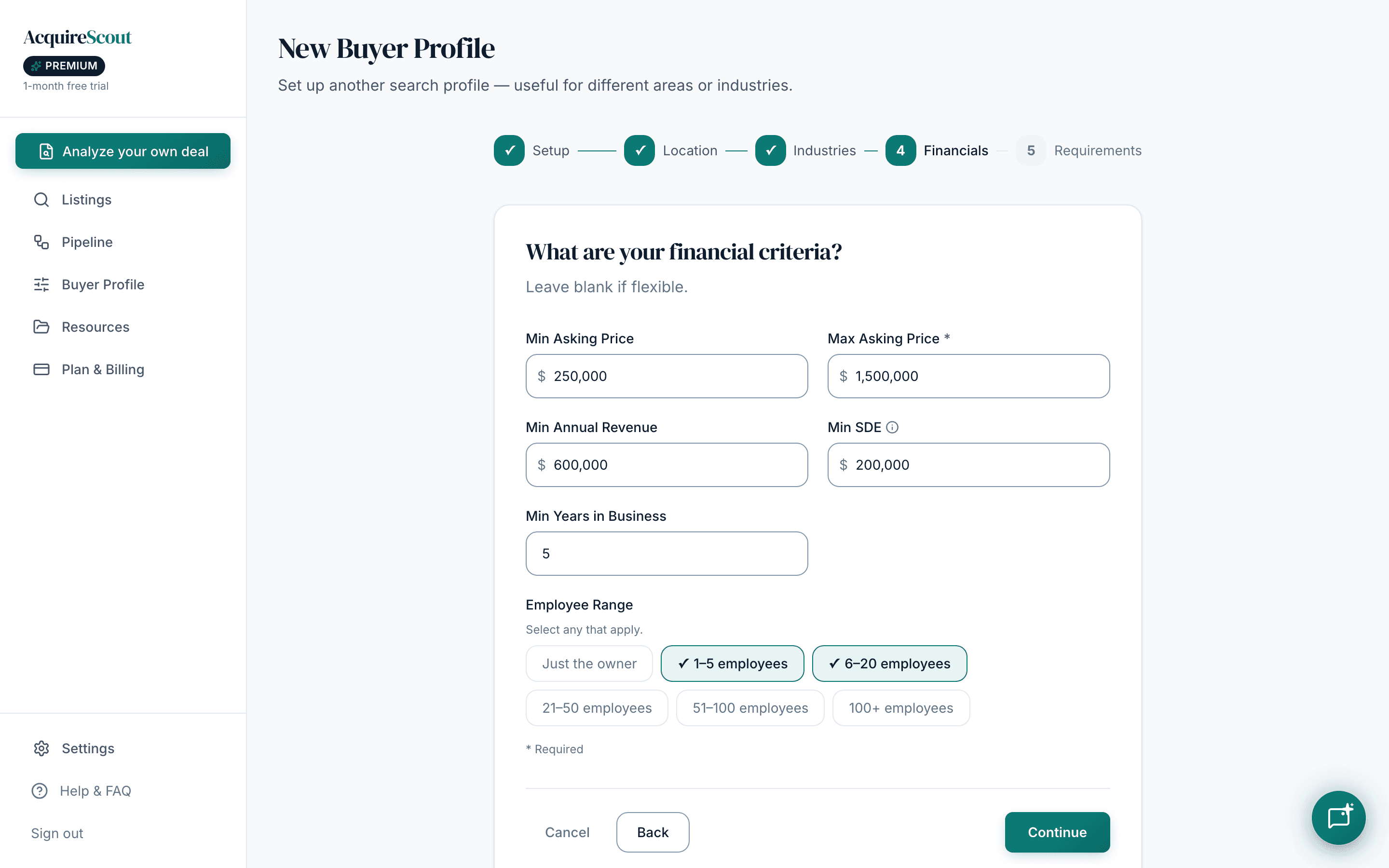
Financials
Min / Max Asking Price, Min Annual Revenue, Min SDE, Min Years in Business, and an Employee Range.
Max asking price should be what you can actually close — including the down payment you have and the debt you can realistically service, not the headline number you'd love. Min SDE is the one that quietly matters most: it's the earnings the business has to throw off before it can pay you and the loan.
Sources & requirements
Choose which listing sites to search — at least one is required — and add any must haves in plain English (
must have an existing management team,at least 3 years of tax returns).
Run the search and read the results
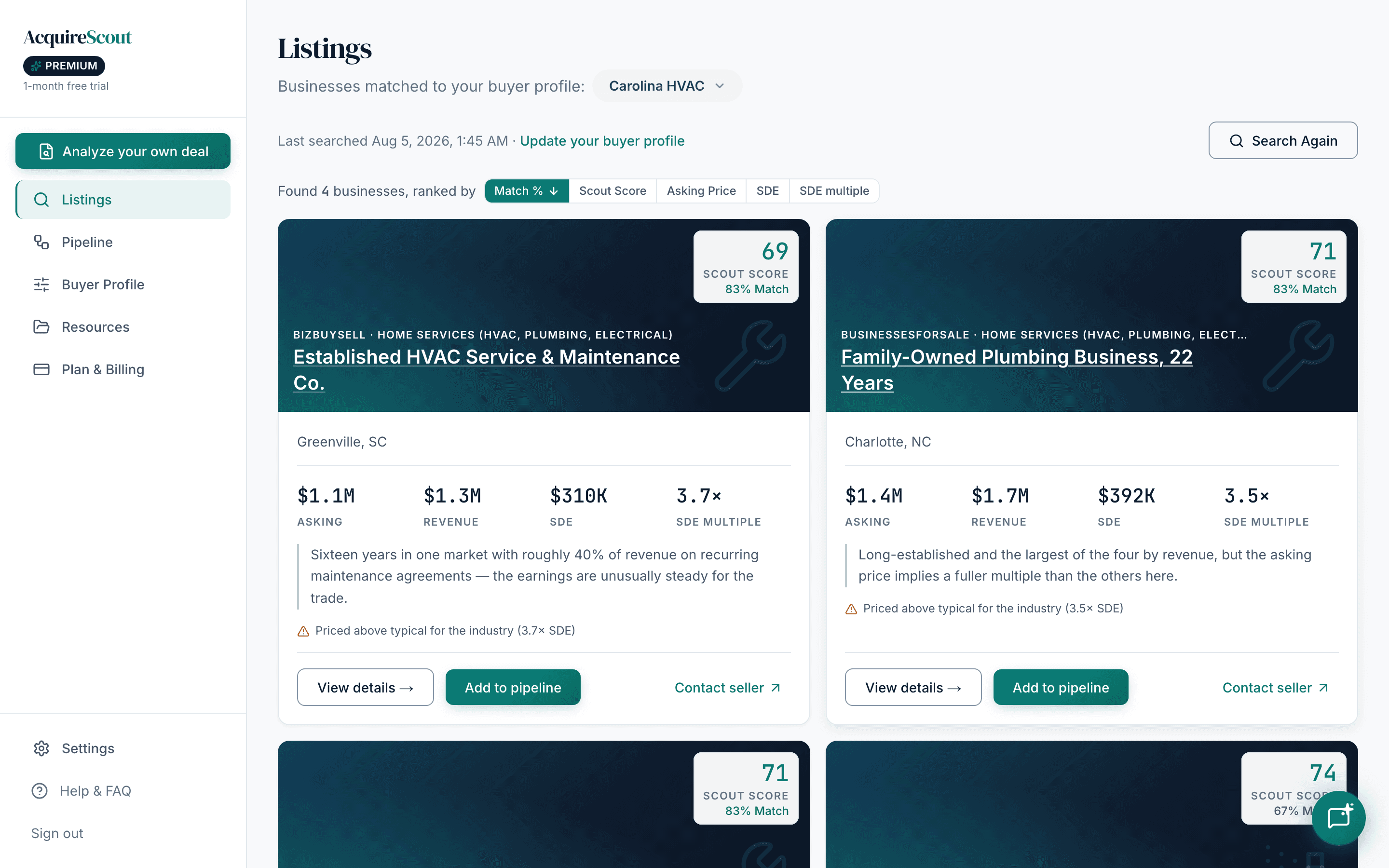
With a profile saved, Listings is your feed. Each card carries the business, its asking price, revenue and SDE, the SDE multiple, and its scores.
Use the sort row rather than scrolling. Three habits worth forming:
- Sort by Scout Score to find deals that are objectively priced well, then check whether you'd want them.
- Sort by SDE multiple, ascending to surface the cheapest earnings in your category. A low multiple is either an opportunity or a warning, and you can't tell which from the listing — which is the point at which you ask for documents.
- Sort by Match % when you're confident in your criteria and just want the closest fits.
Use more than one profile
If you're seriously looking at two different things — an HVAC business in Texas and a Shopify store — don't stretch one profile across both. You'll get a price band that fits neither and matches that mean nothing.
Make a second profile and switch between them. Each keeps its own criteria and its own scored feed.
What counts against your plan
Searches are metered; profiles aren't. On Free you get 10 searches per month, resetting monthly. Standard and Premium are unlimited under fair use. Creating, editing and keeping multiple profiles doesn't consume anything on any plan. Current prices and limits are on the pricing page.
Once a listing is worth more than a glance, it belongs in your pipeline — that's where a search result becomes a deal you're actually working.