Everything up to this point runs on numbers the seller gave you. The asking price rests on a cash-flow figure they calculated, using add-backs they chose, on a P&L they prepared. None of it is audited. Some of it is optimistic. A little of it is wrong.
This is the step where that stops being an assumption.
You upload the seller's own documents, and the engine recomputes the earnings from those documents — then shows you where its number and theirs disagree.
What to ask the seller for
Seven documents, and the two that matter most are the P&L and the tax return together — a P&L on its own can be checked for internal consistency but can't be checked against anything. Which documents to request from a seller covers the full list and why each one earns its place.
The analysis reads all of them: P&L, tax return, balance sheet, bank statements, CIM, lease, and customer or supplier contracts.
Upload them
Open the deal
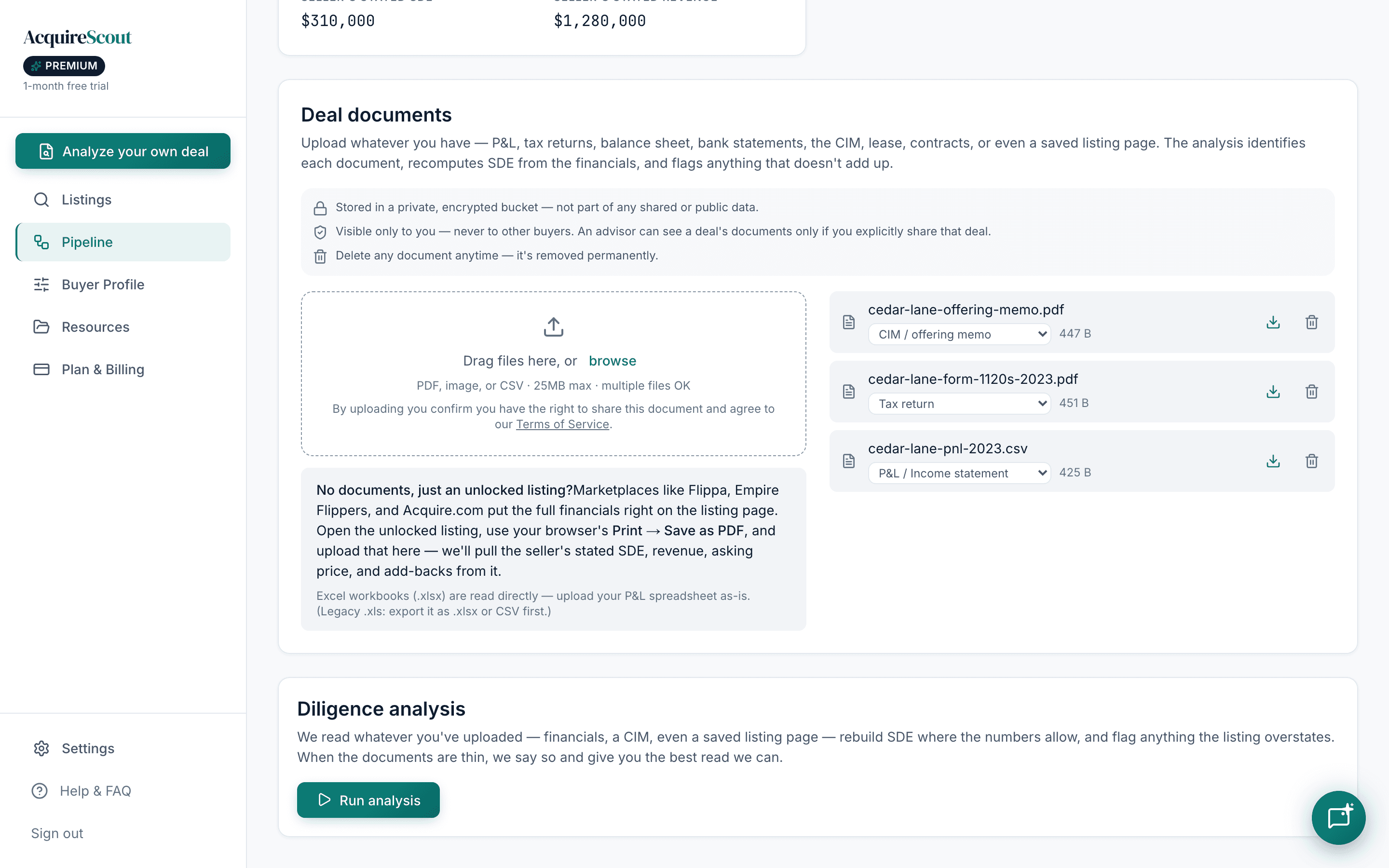
From Pipeline, open the deal's Deal Room and go to Documents. Documents live with the deal, so everything stays together as it moves through the stages.
Upload and label
Add the files and tell it what each one is — P&L, tax return, balance sheet, bank statement, CIM, lease, contract. Labelling matters: a tax return is read differently from a P&L. If you're not sure, upload it as Other and it will be classified for you.
Run the analysis
Extraction runs per document, then the figures are reconciled against each other and the report is produced.
PDFs, scans, images and spreadsheets all work. Scanned paper is fine — it's read the same way, though a clean export always beats a photograph of a printout.
Reading the report
The Adjustment — stated vs. verified
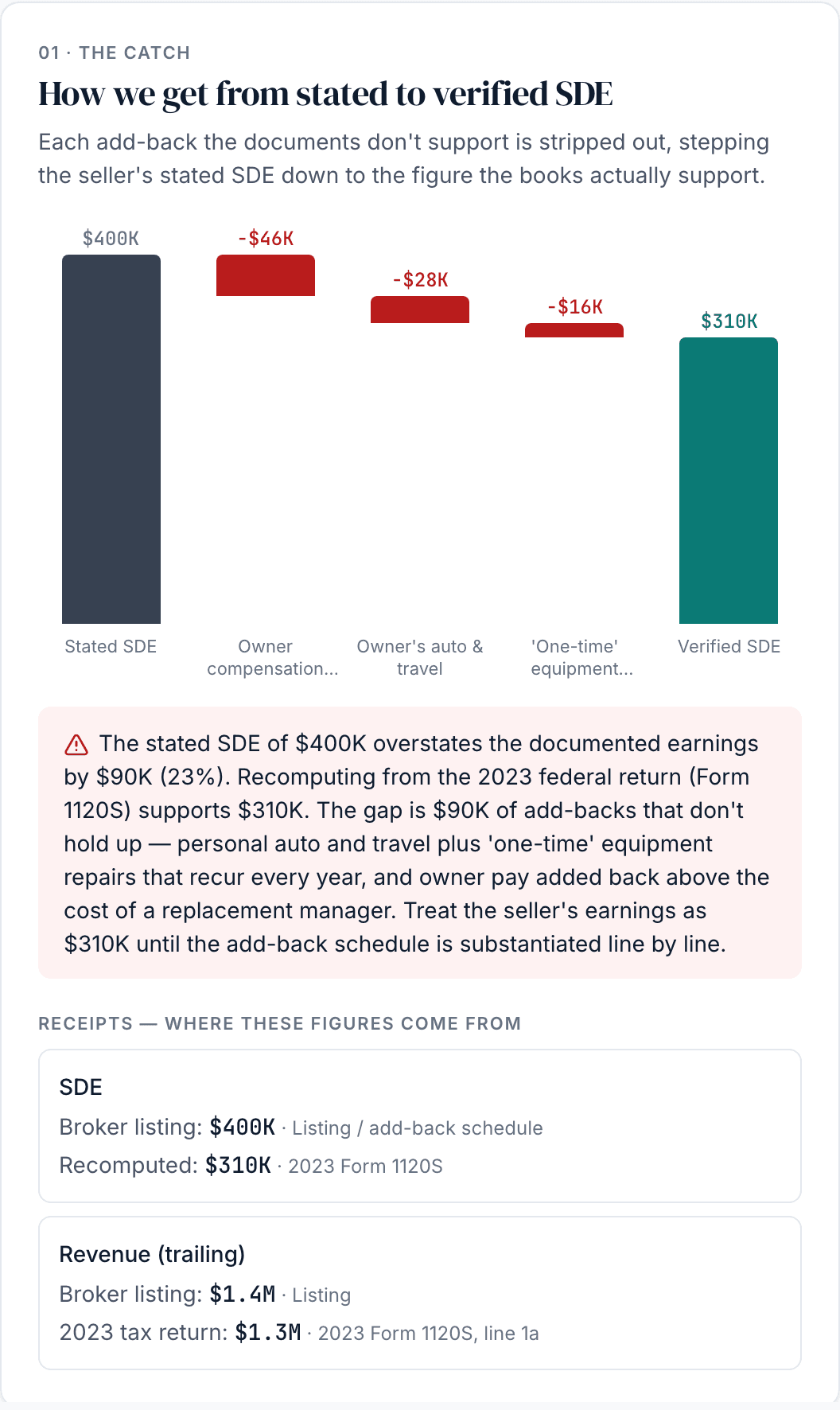
The headline. The seller says the business earns X; the documents support Y. The report shows both, and walks you from one to the other, line by line.
This is the number to internalise, because the asking price was set using X. If verified SDE comes in materially below stated SDE, then at the same multiple, the business is worth less than what's being asked — and you now have a documented reason to say so.
Earnings quality
Whether the earnings are the kind you can rely on. Are they consistent year to year, or is one good year carrying the average? Do the documents agree with each other? A business with steady, boring, reconcilable earnings is worth more than one with the same average and a wild spread — and this section is where that shows up.
Add-backs
Each add-back the seller claimed is scrutinised individually, against one test: does this expense actually disappear when the owner changes? Rejected add-backs are listed with the reason, and each one moves the verified earnings figure. (What add-backs are and why they're the easiest number in a deal to inflate.)
Economics
What the deal looks like as an investment at the asking price — the multiple you're actually paying on verified earnings, and what that leaves once debt is served.
Risk profile
What could hurt you: customer concentration, dependence on the owner personally, lease exposure, industry-specific pressures. Drawn from the documents and the business's own profile.
Diligence plan
What to do next — the specific questions and documents that would resolve what's still open. This is the part to take into your next seller call.
Every figure is cited
The report tracks how many of its material figures are traced to a source document, and shows you the count. Each cited figure links back to the document it came from, so you can open the page and see it yourself.
This matters for a reason worth being blunt about: a language model asked to analyse financials will happily produce a confident number it has no basis for. Citation coverage is how you tell the difference. A figure without a citation is a figure to check yourself.
The verdict
Each analysis ends in one of four:
- Pursue — the numbers hold up. Keep going.
- Pursue with conditions — worth continuing, with specific things to resolve first.
- Need more info — the documents provided don't support a conclusion either way. Go back and ask.
- Pass — the documents contradict the story.
It's a summary of what the documents support, not a decision. You may pursue a deal marked Pass because you know something the paperwork doesn't. But you should know that's what you're doing.
What counts against your plan
Document analysis is the metered feature. Free includes one deal verification, for life — enough to run a real deal through it. Standard and Premium both cover ongoing analysis; Premium additionally unlocks the add-back scrutiny and economics sections described above. Searching, the pipeline, notes and checklists aren't affected. Current prices are on the pricing page.
When the numbers hold up, the next step is putting an offer in writing — the LOI generator.